Printer moves / homes in the wrong direction
fix Z stepper
Verify that the rotation distance was changed from 8 (lead screw) to a pulley
[stepper_z]
(...)
rotation_distance: 40
Y stepper on Enderwires (Microswitch at the rear)
Correct the positions as shown below and remove homing_positive_dir: true
[stepper_y]
(...)
position_endstop: 0
position_min: 0
position_max: 237
Verify stepper movements
Verify that the steppers are plugged in the correct sockets (or pins assigned) and that they spin in the correct direction
put this in your printer.cfg and restart klipper
[force_move]
enable_force_move: True
- Manually put the toolhead in the middle Z and X by hand and send:
SET_KINEMATIC_POSITION X=60 Y=60 Z=50 G91 - Check X movement
- send:
G0 X5 - Does it move the toolhead to the right?
- send:
- Check Z movement
- send:
G0 Z5 - Does it move up?
- send:
- see Switchwire graphic to figure out what to change.
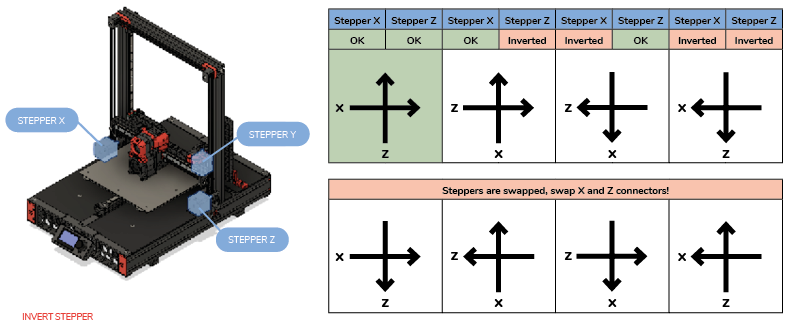
To invert a stepper add a ! to the dir_pin.
dir_pin:  PB7  # <-- normal
dir_pin: !PB7  # <-- inverted
Printer loses steps, prints wrong size
- You are likely using 18 instead of the 20 teeth pulleys.
- Count the teeth on the pulley, rotation distance
rotation_distance = <belt_pitch> * <number_of_teeth_on_pulley>. (2x18 = 36, 2x20 = 40))
- Count the teeth on the pulley, rotation distance
- check if you use 0.9° instead of 1.8° steppers, adjust
full_steps_per_rotationto400
Diagonal Movements
Check the previous sections first, then return to this.
verify:
- grub screw’s on the motors is tight
- belts have about the same tension
- there are no funny sounds, rubbing or belt jumping over the pulley/idler walls
- you are using
microsteps: 16for Creality board ormicrosteps: 32(or higher) for all other that support tmc drivers